Asked AI to Test My App. It Took Over My Mac
A practical workflow for using AI agents to test web and desktop apps with Playwright, Appium, isolated environments, and failure-first QA prompts.

Vibe coding a website is pretty easy these days. Most models do an incredible job, at least on day one, and spawn a website in minutes.
But just coding it and letting the user test it is a bad idea. So you probably want the AI to test what it coded, right?
Web browser testing is quite streamlined and simple with frameworks like Selenium and Playwright, which models are very familiar with.
But when it comes to building desktop applications, or a Chrome extension, or other special kinds of applications, things become a bit more tedious. Especially when it comes to testing those applications. And with Mac, even more.
- the application needs access to your mouse and keyboard
- it takes control of your PC
- it needs extra permissions for accessibility and screen monitoring
- and it interrupts your work, if you are using that same PC for other stuff
And probably a few more annoying, even dangerous caveats. Think security.
And here is what that actually looks like:
The first time I asked an agent to test a macOS app I had just built, it did exactly what I asked. It installed Appium, built WebDriverAgentMac, took over my keyboard, and screenshotted the result.
The screenshot included a window from a different application. Mine, but not the one under test.
Nothing malfunctioned. Everything worked exactly as designed.
If you haven't heard about Appium yet, it is an open-source automation framework that lets you control native apps through OS-level accessibility APIs. Because it hooks directly into the OS, an agent driving a GUI is driving your GUI. Synthetic keystrokes go to whatever window happens to be frontmost. A screenshot captures whatever happens to be on your screen.
I had even tried blocking AppleScript on that machine with a hook, but Appium walked straight around it. The hook only guarded one binary. The problem was never the binary, it was giving the agent that broad capability on my actual workstation in the first place.
We need a setup where the agent gets the control it needs without sharing our desktop.
What we want instead
- the application runs in an isolated environment
- entirely separate from the machine we work on
- and the AI is able to control it remotely
So what about sandboxes like a VM or Docker?
This might be a good solution, but it has one caveat. They hardly work for Mac applications.
So we need a real Mac to test on, different from our host. I first tried UTM, an awesome and easy open source solution, but it was too clunky when it came to automation. Remember, we want the AI to have control over this VM.
So we ended up with Parallels, which happens to have support for remote control via the CLI.
What Parallels does:
It runs another operating system in a window on your Mac. On Apple Silicon that includes macOS itself, so you get a second, real Mac — its own desktop, its own disk, its own permissions — that you can throw away and remake. The reason it is in this post and not VMware or UTM: it ships `prlctl`, a command line tool that runs shell commands inside the guest and screenshots it from outside. That is the whole hinge. An agent can drive the VM without ever touching your machine.
And here is how it works.
How it works
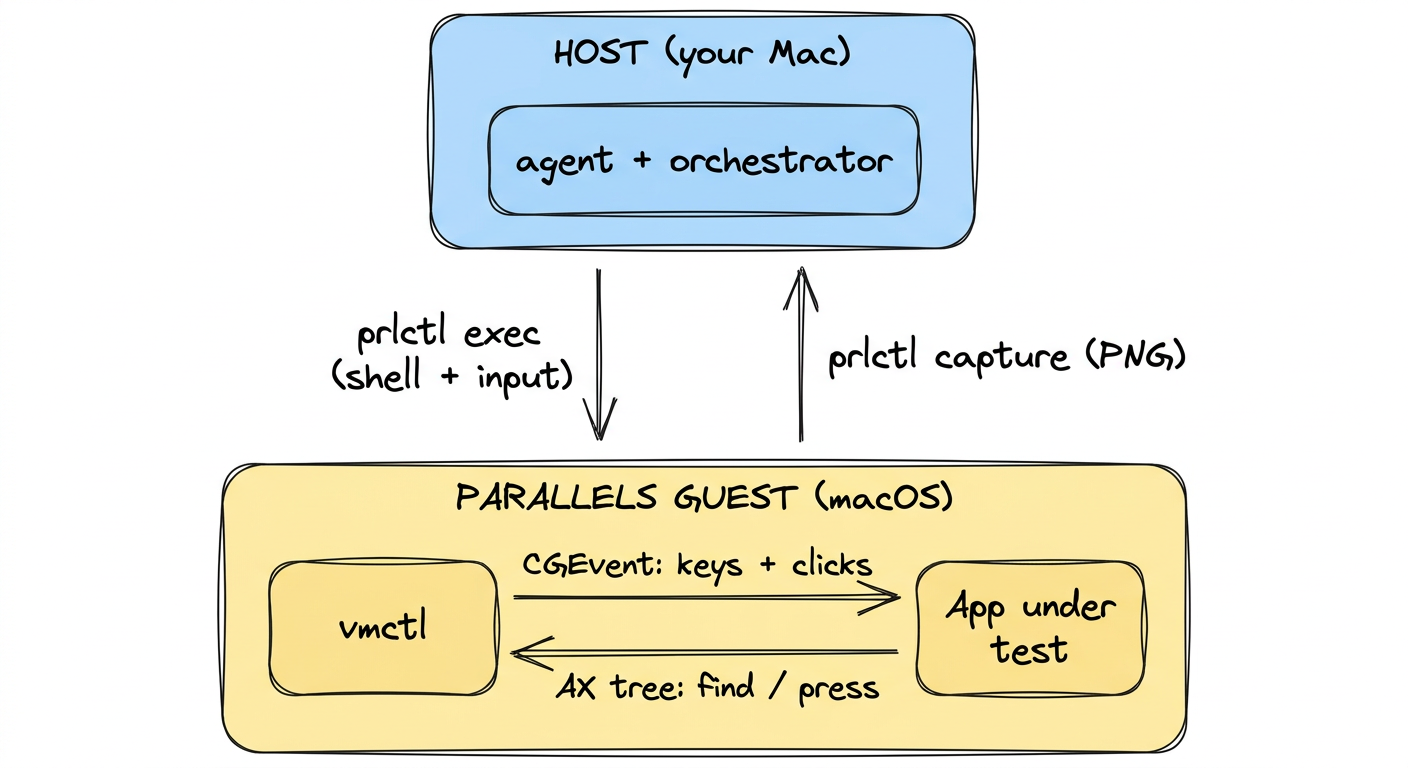
The VM cannot screenshot itself, so the eyes and the hands live in different places.
Eyes, from the host. prlctl capture macOS --file shot.png grabs the guest's framebuffer from outside. No permission needed, and it cannot capture your screen.
Hands, inside the guest. vmctl is a tiny Swift binary, 89 KB, compiled once in the guest. It posts real keystrokes and clicks. Commands go in on stdin, because prlctl exec mangles argv.
Parallels Desktop will download and install macOS for you in a few clicks — follow their user guide for that part. You end up with this:
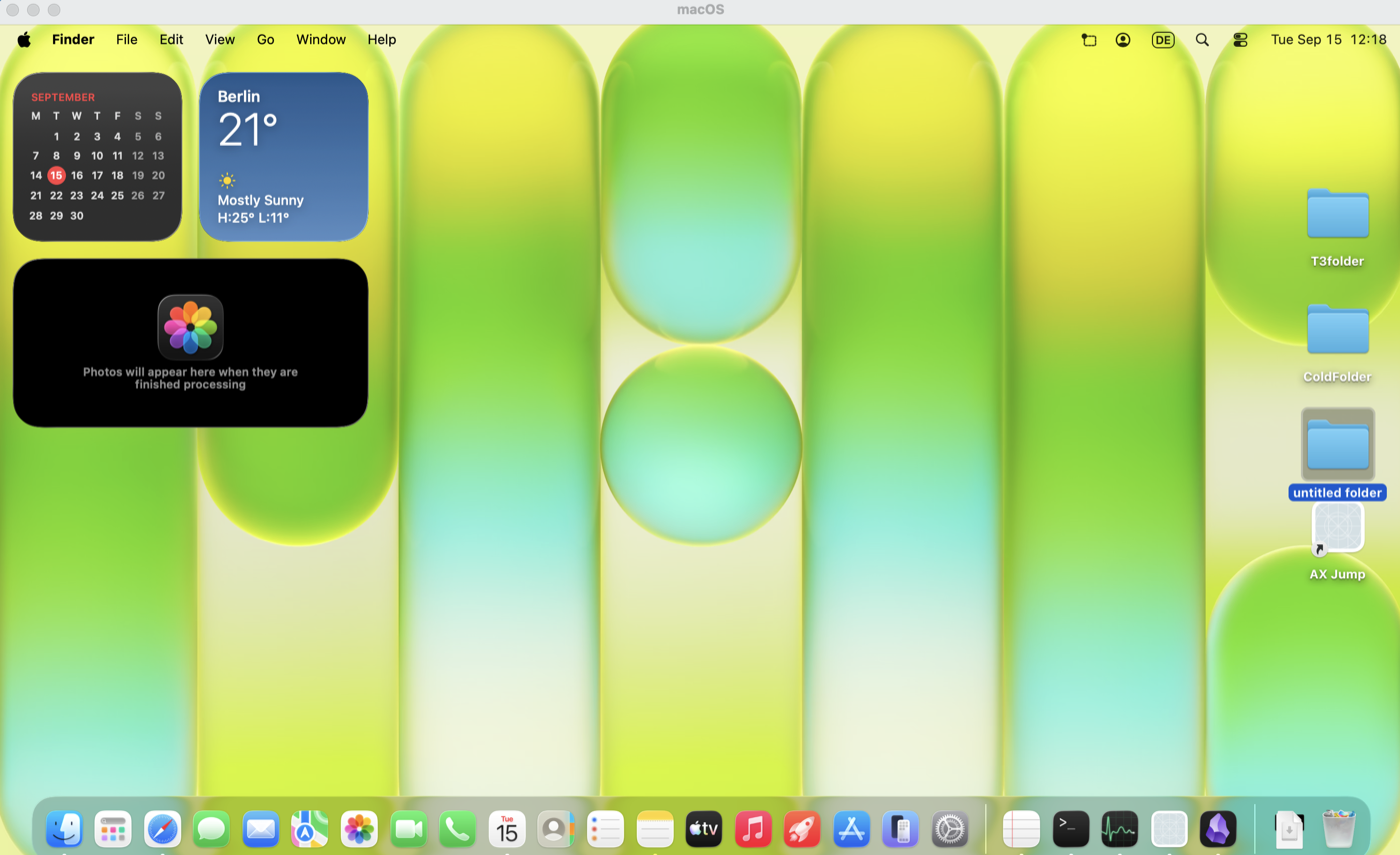
Its own desktop, its own Dock, its own TCC database. vmctl needs Accessibility in there — the only permission in the whole setup, scoped to a disposable VM.
Everything else is in the reference at the end: shipping the app in, the dependency traps, the orchestrator, and the prompts.
Why screenshots alone make you blind
Isolation costs you your eyes. prlctl capture just dumps pixels from outside the VM, so your automation has to guess: look at a picture, eyeball the coordinates, click, capture again, and pray.
When a button in a settings window stopped responding, The AI spent eight rounds nudging coordinates. I had no idea if the control was broken, occluded, or if my click target was completely off. Screenshots have no concept of what an actual button is.
The fix is Apple's Accessibility API (AXUIElement), accessible right inside the Parallels guest. Instead of dragging in heavy frameworks, vmctl queries AXUIElement directly:
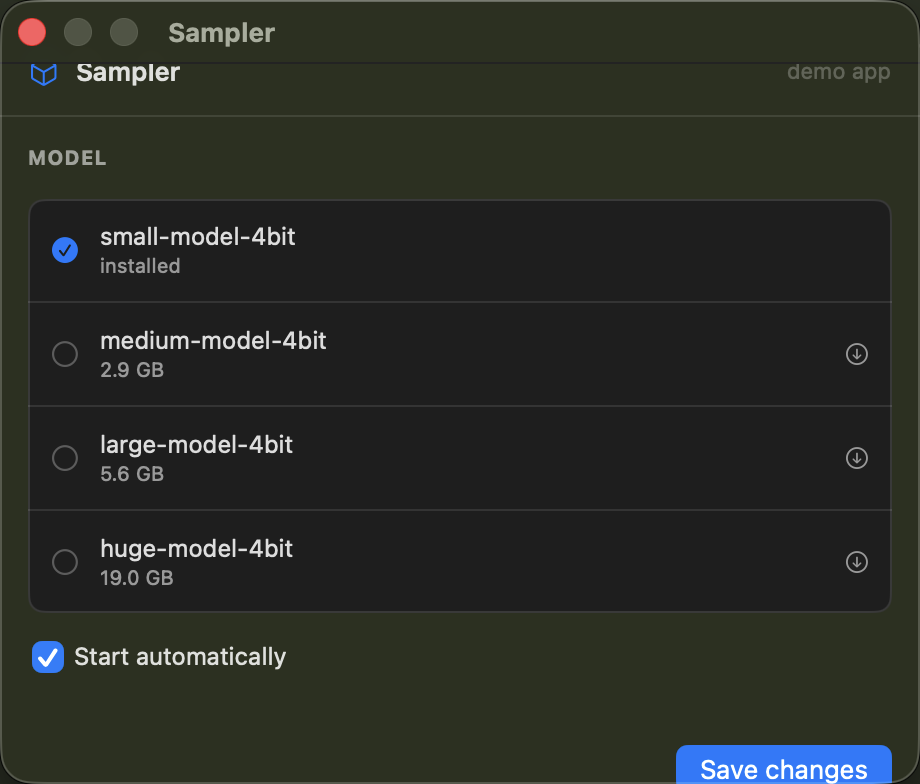
Those rows look like plain text, but the tree exposes their real state immediately:
$ vmctl find "medium-model" $PID
AXButton "medium-model-4bit, 2.9 GB" @482,249 432x51 [pressable]
Role, label, state, exact frame. Instead of guessing coordinates and hoping the cursor hits the right window, vmctl press "medium-model" $PID resolves the element inside that target process and invokes it directly.
One trap: kAXFocusedApplication does not track menu-bar (LSUIElement) apps. You must pass the PID explicitly, or the query returns nothing.
Why you still need a hybrid approach
The accessibility tree handles functional state, but it cannot replace screenshots entirely. Take this window edge:
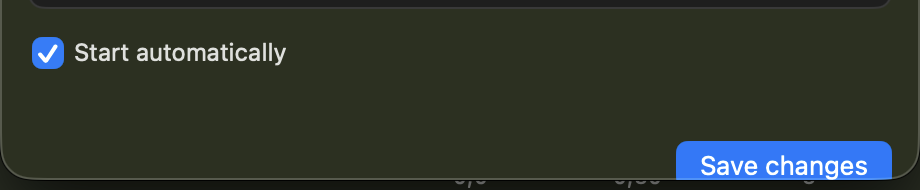
The Save button is cut in half. The accessibility tree says everything is fine:
AXWindow "Sampler"      @900,73   460x392   → bottom 465
AXButton "Save changes" @1238,445 108x24    → bottom 469
The button is technically present, enabled, and pressable. You would only catch the clipping programmatically by comparing the child frame against the parent window frame. But one glance at the screenshot makes the bug obvious.
Use the AX tree to verify that controls work; use host screenshots to verify that they render correctly.
The Limitations
A VM gives you isolation, not an identical clone of production:
- Contained permissions, not eliminated ones: Accessibility access is still live, just confined to a disposable guest.
- Hardware gaps: You cannot test camera inputs, microphone feeds, or deep GPU workloads through paravirtual graphics.
- Visual clipping: As shown above, the tree will report broken, clipped controls as fully functional.
Isolating the agent stops it from reading your host screen. Giving it AX tree access stops it from burning hours guessing coordinates.
Happy Vibe Coding.
Reference — everything to copy
Hand these to your agent. Nothing above depends on reading them in order.
vmctl.swift — the guest input tool
// vmctl.swift — guest-side input injector
// Build: swiftc -O -o vmctl vmctl.swift
import Foundation
import CoreGraphics
import Carbon.HIToolbox

// MARK: keyboard layout

/// Resolve a character to a keycode using the LIVE keyboard layout.
/// Hardcoding a US table is the #1 source of silent corruption on
/// non-US guests — on a German layout, y and z are swapped and `/`
/// is Shift+7.
func keyCodeFor(char: Character) -> (CGKeyCode, CGEventFlags)? {
    guard let source = TISCopyCurrentKeyboardLayoutInputSource()?
            .takeRetainedValue(),
          let ptr = TISGetInputSourceProperty(
            source, kTISPropertyUnicodeKeyLayoutData)
    else { return nil }
    let data = Unmanaged<CFData>.fromOpaque(ptr).takeUnretainedValue() as Data

    let target = String(char)
    // Brute-force the layout: try every keycode with every modifier
    // combination we care about and keep the first exact match.
    for code in 0..<128 {
        for (mods, flags) in [(UInt32(0), CGEventFlags()),
                              (UInt32(shiftKey >> 8), .maskShift),
                              (UInt32(optionKey >> 8), .maskAlternate)] {
            var deadKeys: UInt32 = 0
            var length = 0
            var chars = [UniChar](repeating: 0, count: 4)
            let status = data.withUnsafeBytes { raw -> OSStatus in
                let layout = raw.bindMemory(to: UCKeyboardLayout.self)
                    .baseAddress!
                return UCKeyTranslate(layout, UInt16(code), UInt16(kUCKeyActionDown),
                                      mods, UInt32(LMGetKbdType()),
                                      OptionBits(kUCKeyTranslateNoDeadKeysBit),
                                      &deadKeys, 4, &length, &chars)
            }
            if status == noErr, length > 0,
               String(utf16CodeUnits: chars, count: length) == target {
                return (CGKeyCode(code), flags)
            }
        }
    }
    return nil
}

let named: [String: CGKeyCode] = [
    "return": 36, "enter": 36, "tab": 48, "space": 49, "delete": 51,
    "esc": 53, "escape": 53, "left": 123, "right": 124, "down": 125,
    "up": 126, "home": 115, "end": 119, "pageup": 116, "pagedown": 121,
    "f1": 122, "f2": 120,
]

func flags(from args: ArraySlice<String>) -> CGEventFlags {
    var f = CGEventFlags()
    for a in args {
        switch a {
        case "cmd", "command": f.insert(.maskCommand)
        case "shift":          f.insert(.maskShift)
        case "opt", "option", "alt": f.insert(.maskAlternate)
        case "ctrl", "control": f.insert(.maskControl)
        default: break
        }
    }
    return f
}

func press(_ code: CGKeyCode, _ f: CGEventFlags) {
    let src = CGEventSource(stateID: .combinedSessionState)
    let down = CGEvent(keyboardEventSource: src, virtualKey: code, keyDown: true)
    let up   = CGEvent(keyboardEventSource: src, virtualKey: code, keyDown: false)
    down?.flags = f
    up?.flags = f
    down?.post(tap: .cghidEventTap)
    usleep(12_000)
    up?.post(tap: .cghidEventTap)
    usleep(12_000)
}

func mouse(_ type: CGEventType, _ p: CGPoint, _ button: CGMouseButton,
           clicks: Int64 = 1) {
    let src = CGEventSource(stateID: .combinedSessionState)
    let e = CGEvent(mouseEventSource: src, mouseType: type,
                    mouseCursorPosition: p, mouseButton: button)
    if clicks > 1 { e?.setIntegerValueField(.mouseEventClickState, value: clicks) }
    e?.post(tap: .cghidEventTap)
}

func click(_ x: Double, _ y: Double, right: Bool = false, clicks: Int64 = 1) {
    let p = CGPoint(x: x, y: y)
    mouse(.mouseMoved, p, .left)
    usleep(40_000)
    let (d, u, b): (CGEventType, CGEventType, CGMouseButton) =
        right ? (.rightMouseDown, .rightMouseUp, .right)
              : (.leftMouseDown, .leftMouseUp, .left)
    mouse(d, p, b, clicks: clicks)
    usleep(30_000)
    mouse(u, p, b, clicks: clicks)
}

// MARK: dispatch

let argv = CommandLine.arguments
guard argv.count > 1 else {
    print("usage: vmctl trusted|pos|key|type|click|rclick|dblclick|move|scroll")
    exit(64)
}

switch argv[1] {
case "trusted":
    // Reports whether this binary holds Accessibility in the GUEST.
    print(AXIsProcessTrusted() ? "trusted" : "NOT trusted")

case "pos":
    let e = CGEvent(source: nil)
    print("\(Int(e?.location.x ?? 0)) \(Int(e?.location.y ?? 0))")

case "key":
    guard argv.count > 2 else { exit(64) }
    let k = argv[2]
    let f = flags(from: argv.dropFirst(3))
    if let code = named[k.lowercased()] {
        press(code, f)
    } else if k.hasPrefix("kc"), let raw = UInt16(k.dropFirst(2)) {
        press(CGKeyCode(raw), f)
    } else if k.count == 1, let (code, extra) = keyCodeFor(char: k.first!) {
        press(code, f.union(extra))
    } else {
        // Exit non-zero rather than silently pressing keycode 0.
        FileHandle.standardError.write("unresolvable key: \(k)\n".data(using: .utf8)!)
        exit(3)
    }

case "type":
    guard argv.count > 2 else { exit(64) }
    for ch in argv[2] {
        if ch == "\n" { press(36, []); continue }
        guard let (code, extra) = keyCodeFor(char: ch) else { continue }
        press(code, extra)
    }

case "click", "rclick", "dblclick":
    guard argv.count > 3, let x = Double(argv[2]), let y = Double(argv[3])
    else { exit(64) }
    click(x, y, right: argv[1] == "rclick", clicks: argv[1] == "dblclick" ? 2 : 1)

case "move":
    guard argv.count > 3, let x = Double(argv[2]), let y = Double(argv[3])
    else { exit(64) }
    mouse(.mouseMoved, CGPoint(x: x, y: y), .left)

case "scroll":
    guard argv.count > 2, let dy = Int32(argv[2]) else { exit(64) }
    let src = CGEventSource(stateID: .combinedSessionState)
    CGEvent(scrollWheelEvent2Source: src, units: .pixel, wheelCount: 1,
            wheel1: dy, wheel2: 0, wheel3: 0)?.post(tap: .cghidEventTap)

default:
    exit(64)
}
Build on the host, then ship the binary in:
swiftc -O -o /tmp/vmctl vmctl.swift
base64 -i /tmp/vmctl | prlctl exec macOS --current-user /bin/bash -c '
  mkdir -p "$HOME/.vmctl" && base64 -d > "$HOME/.vmctl/vmctl" &&
  chmod +x "$HOME/.vmctl/vmctl"'
The accessibility extension
Add these to the same binary. They need no extra import — ApplicationServices is already there for AXIsProcessTrusted().
// ---- Accessibility inspection -------------------------------------------
// Same API WebDriverAgent uses under the hood; vmctl already holds the AX
// grant, so this needs no Xcode, no server and no extra permission.
func axGet(_ el: AXUIElement, _ name: String) -> CFTypeRef? {
    var v: CFTypeRef?
    return AXUIElementCopyAttributeValue(el, name as CFString, &v) == .success ? v : nil
}
func axKids(_ el: AXUIElement) -> [AXUIElement] {
    return (axGet(el, kAXChildrenAttribute as String) as? [AXUIElement]) ?? []
}
func axRole(_ el: AXUIElement) -> String { return (axGet(el, kAXRoleAttribute as String) as? String) ?? "?" }
func axLabel(_ el: AXUIElement) -> String {
    for k in [kAXTitleAttribute, kAXValueAttribute, kAXDescriptionAttribute] as [String] {
        if let s = axGet(el, k) as? String, !s.isEmpty { return s }
    }
    return ""
}
func axFrame(_ el: AXUIElement) -> CGRect? {
    guard let pv = axGet(el, kAXPositionAttribute as String),
          let sv = axGet(el, kAXSizeAttribute as String) else { return nil }
    var o = CGPoint.zero, sz = CGSize.zero
    AXValueGetValue(pv as! AXValue, .cgPoint, &o)
    AXValueGetValue(sv as! AXValue, .cgSize, &sz)
    return CGRect(origin: o, size: sz)
}
func axActions(_ el: AXUIElement) -> [String] {
    var n: CFArray?
    return AXUIElementCopyActionNames(el, &n) == .success ? ((n as? [String]) ?? []) : []
}
func axEnabled(_ el: AXUIElement) -> Bool {
    return (axGet(el, kAXEnabledAttribute as String) as? Bool) ?? true
}
// LSUIElement (menu-bar) apps are NOT reported by kAXFocusedApplication, so
// resolve in order: explicit pid arg -> frontmost on-screen window's owner ->
// system-wide focused app.
func frontWindowPID() -> pid_t? {
    guard let list = CGWindowListCopyWindowInfo([.optionOnScreenOnly, .excludeDesktopElements],
                                                kCGNullWindowID) as? [[String: Any]] else { return nil }
    for w in list {
        guard let layer = w[kCGWindowLayer as String] as? Int, layer == 0,
              let pid = w[kCGWindowOwnerPID as String] as? pid_t else { continue }
        return pid
    }
    return nil
}
func targetApp(_ explicit: pid_t?) -> AXUIElement? {
    if let p = explicit, p > 0 { return AXUIElementCreateApplication(p) }
    if let p = frontWindowPID() { return AXUIElementCreateApplication(p) }
    return axGet(AXUIElementCreateSystemWide(), kAXFocusedApplicationAttribute as String)
        .map { unsafeBitCast($0, to: AXUIElement.self) }
}
func describe(_ el: AXUIElement) -> String {
    let f = axFrame(el)
    let frame = f.map { " @\(Int($0.minX)),\(Int($0.minY)) \(Int($0.width))x\(Int($0.height))" } ?? ""
    let acts = axActions(el).filter { $0 == "AXPress" }.isEmpty ? "" : " [pressable]"
    let dis = axEnabled(el) ? "" : " [disabled]"
    let lbl = axLabel(el)
    return axRole(el) + (lbl.isEmpty ? "" : " \"" + lbl.prefix(60) + "\"") + frame + acts + dis
}
var walked = 0
func walk(_ el: AXUIElement, _ depth: Int, _ maxDepth: Int, _ visit: (AXUIElement, Int) -> Bool) {
    if depth > maxDepth || walked > 4000 { return }
    walked += 1
    if !visit(el, depth) { return }
    for k in axKids(el) { walk(k, depth + 1, maxDepth, visit) }
}
And the commands themselves:
case "tree":
    let maxDepth = a.count > 1 ? Int(a[1]) ?? 12 : 12
    let tpid: pid_t? = a.count > 2 ? pid_t(a[2]) : nil
    guard let app = targetApp(tpid) else { print("no target app"); exit(3) }
    walk(app, 0, maxDepth) { el, d in
        print(String(repeating: "  ", count: d) + describe(el)); return true
    }
case "find", "press", "clickel":
    guard a.count > 1 else { print("need a search string"); exit(2) }
    let fpid: pid_t? = a.count > 2 ? pid_t(a[2]) : nil
    guard let app = targetApp(fpid) else { print("no target app"); exit(3) }
    let needle = a[1].lowercased()
    var hits: [AXUIElement] = []
    walk(app, 0, 20) { el, _ in
        if axLabel(el).lowercased().contains(needle) { hits.append(el) }
        return true
    }
    if hits.isEmpty { print("no match for \(a[1])"); exit(4) }
    if cmd == "find" {
        for h in hits { print(describe(h)) }
    } else if cmd == "press" {
        guard let target = hits.first(where: { axActions($0).contains("AXPress") }) else {
            print("matched \(hits.count) element(s) but none is pressable:")
            for h in hits { print("  " + describe(h)) }
            exit(5)
        }
        let r = AXUIElementPerformAction(target, "AXPress" as CFString)
        print(r == .success ? "pressed: \(describe(target))" : "AXPress failed rc=\(r.rawValue)")
        if r != .success { exit(6) }
    } else {
        guard let f = hits.compactMap({ axFrame($0) }).first else { print("no frame"); exit(5) }
        let c = CGPoint(x: f.midX, y: f.midY)
        mouse(.mouseMoved, c); usleep(120000)
        mouse(.leftMouseDown, c); usleep(60000); mouse(.leftMouseUp, c)
        print("clicked centre \(Int(c.x)),\(Int(c.y)) of \(describe(hits[0]))")
    }
Usage. Always pass the pid: kAXFocusedApplication ignores menu-bar apps.
PID=$(pgrep -f "MenuBarApp.app/Contents/MacOS/")
vmctl tree  4 "$PID"         # hierarchy with roles, frames, [pressable]
vmctl find  "Save" "$PID"    # every element whose label contains "Save"
vmctl press "Save" "$PID"    # AXPress it — no coordinates
ship-app.sh — copy a .app bundle into the guest
#!/usr/bin/env bash
# ship-app.sh — copy a .app bundle into the guest
set -euo pipefail
APP="${1:?usage: ship-app.sh /path/to/App.app}"
VM="${VM:-macOS}"
NAME="$(basename "$APP")"

cd "$(dirname "$APP")"

{
  echo 'set -e'
  echo 'mkdir -p "$HOME/Applications"'
  echo 'base64 -d > /tmp/app.tgz <<'"'"'B64EOF'"'"''
  tar czf - "$NAME" | base64
  echo 'B64EOF'
  cat <<'INNER'
rm -rf "$HOME/Applications/$NAME"
tar xzf /tmp/app.tgz -C "$HOME/Applications"
INNER
  echo "codesign --force --sign - --identifier com.example.app \"\$HOME/Applications/$NAME\""
  echo "xattr -dr com.apple.quarantine \"\$HOME/Applications/$NAME\" 2>/dev/null || true"
  echo "vtool -show-build-version \"\$HOME/Applications/$NAME/Contents/MacOS/\"* 2>/dev/null | grep -E 'minos|sdk'"
} | prlctl exec "$VM" --current-user /bin/bash
shot.sh — capture, crop, downscale
#!/usr/bin/env bash
# shot.sh — capture, crop the letterbox, downscale
set -euo pipefail
NAME="${1:-shot}"
VM="${VM:-macOS}"
OUT="${OUT_DIR:-/tmp}"

prlctl capture "$VM" --file "$OUT/$NAME.png"

# Crop the black letterbox bars. Measure YOUR values once with:
#   sips -g pixelWidth -g pixelHeight "$OUT/$NAME.png"
# then find the content box and hardcode the offsets.
sips -c 986 1568 --cropOffset 456 0 "$OUT/$NAME.png" \
     --out "$OUT/$NAME-crop.png" >/dev/null

# Downscale to ~1000-1200px wide: 5.8x fewer pixels, still fully legible.
sips -Z 1200 "$OUT/$NAME-crop.png" --out "$OUT/$NAME-small.png" >/dev/null

echo "$OUT/$NAME-small.png"
test-app.sh — the complete orchestrator
#!/usr/bin/env bash
# test-app.sh — agent-driven UI test inside a Parallels guest
set -euo pipefail

VM="${VM:-macOS}"
APP_NAME="MenuBarApp.app"
OUT="${OUT_DIR:-$PWD/test-out}"
mkdir -p "$OUT"

say()  { printf '\n\033[1m== %s\033[0m\n' "$*"; }
gexec() { prlctl exec "$VM" --current-user /bin/bash; }

say "0. preflight"
prlctl list -a | grep -q "$VM" || { echo "VM $VM not found"; exit 1; }
prlctl exec "$VM" --current-user "\$HOME/.vmctl/vmctl" trusted \
  | grep -q '^trusted$' || { echo "vmctl lacks Accessibility in guest"; exit 1; }

say "1. launch + verify environment"
gexec <<'EOF'
V="$HOME/.vmctl/vmctl"
export PATH="$HOME/.local/bin:$PATH"

pkill -f "MenuBarApp.app/Contents/MacOS/" 2>/dev/null || true
sleep 1

/usr/bin/open -a "$HOME/Applications/MenuBarApp.app"
for i in $(seq 40); do
  pgrep -f "MenuBarApp.app/Contents/MacOS/" >/dev/null && break
  sleep 0.25
done

echo "PID:   $(pgrep -f 'MenuBarApp.app/Contents/MacOS/' | head -1)"
sleep 3
"$V" key space opt                 # the app's global hotkey
sleep 3
echo "FRONT: $(lsappinfo info -only name "$(lsappinfo front)" 2>/dev/null)"
echo "PORT:  $(lsof -ti tcp:8612 2>/dev/null | wc -l | tr -d ' ')"
EOF

say "2. drive the UI (keyboard only)"
gexec <<'EOF'
V="$HOME/.vmctl/vmctl"
FRONT=$(lsappinfo info -only name "$(lsappinfo front)" 2>/dev/null)
case "$FRONT" in
  *MenuBarApp*) ;;
  *) echo "ABORT: frontmost is $FRONT"; exit 1;;
esac

"$V" key 1 cmd       # first preset action
sleep 2.5
"$V" key . cmd       # cancel / stop
sleep 1
echo "drove: cmd+1 then cmd+."
EOF

say "3. capture final state"
prlctl capture "$VM" --file "$OUT/final.png"
sips -Z 1200 "$OUT/final.png" --out "$OUT/final-small.png" >/dev/null
echo "$OUT/final-small.png"

say "4. verify through data"
gexec <<'EOF'
echo "still running: $(pgrep -f 'MenuBarApp.app/Contents/MacOS/' | wc -l | tr -d ' ')"
echo "server alive:  $(lsof -ti tcp:8612 2>/dev/null | wc -l | tr -d ' ')"
echo "crash logs:    $(ls -1 "$HOME/Library/Logs/DiagnosticReports"/MenuBarApp* 2>/dev/null | wc -l | tr -d ' ')"
EOF
That last check, counting crash reports, catches the failure mode where the app dies and the UI simply is not there. Without it, a test that drives a dead app reports a clean run.
The standing rules (a skill or system prompt)
# VM GUI testing — operating rules

You are testing a macOS app inside a Parallels guest named `macOS`.

## Boundaries
- Operate ONLY inside the guest. Never control host UI, never screenshot the
  host, never run Appium/AppleScript/computer-use tooling on the host.
- Use `prlctl exec` for shell and `$HOME/.vmctl/vmctl` for input.
- Use `prlctl capture` for vision. Never a host screenshot tool.
- Do not grant macOS TCC permissions. If a permission dialog blocks the test,
  stop and report. If an irrelevant dialog appears, choose "Don't Allow".

## Method
- BATCH: put the whole workflow in ONE `prlctl exec` heredoc. Each exec costs
  a fixed ~286ms regardless of payload.
- KEYBOARD FIRST: prefer shortcuts over coordinates, always.
- GUARD FOCUS: check `lsappinfo front` before every `type`. Abort on mismatch.
- POLL for app launch; use a flat >=1.5s sleep for modal sheets.
- VERIFY WITH DATA (files, ports, `defaults read`, process list), not pixels.
- CAPTURE ONCE at the end, plus any first-run blocker. Not between steps.

## Reporting
- NEVER claim success from an exit code. `prlctl exec` returning 0 proves the
  command ran, not that the UI responded.
- If you cannot verify an outcome, report UNVERIFIED — not PASS.
- State explicitly which findings are VM-only and cannot transfer to the host
  (performance, GPU-bound behaviour, host integrations).
The task prompt
Test <APP> in the Parallels guest as a real user would.

Test these states, and report what FAILS:
1. Cold start — is progress shown, or does the user stare at nothing?
2. Primary action via keyboard shortcut only
3. Cancel mid-operation — is partial work kept? do the stats stop lying?
4. Empty input — useful message, or silent failure?
5. A 200-character unbroken string — does the layout survive?
6. Backend killed while the app is open — error state, or a hang?
7. Dependency missing entirely — is that state even rendered?
8. Dark mode
9. Every shortcut: do they all work, and do they still work the SECOND time?

For each: what a user sees, and whether it is correct.
Report failures first. Do not report a list of passes.
If you cannot verify something, say UNVERIFIED and why.
That last instruction matters more than the rest combined. Without "report failures first", an agent testing its own work produces a list of things that went right. You will read it, feel good, and ship the bug.
The bug-isolation prompt
When something fails, the reflex is to theorise. Do not let it:
The <BEHAVIOUR> failed. Do not theorise about the cause.

Design the smallest experiment that distinguishes between your hypotheses.
Run it. Report the observation before the explanation.

Specifically: does it fail always, or only after a particular sequence?
Test the fresh-launch case and the after-first-use case separately.