
Decision Models Are Quietly Replacing a Chunk of LLM Infrastructure

There's a new trend in AI that's already changing how the AI economy works. But most people outside tech haven't heard of it yet.
It's called decision models.
Within 16 days, TypeSafe launched Jev (September 15), OpenAI announced a Decisions API in limited preview (September 29), and Cloudflare shipped two open-source decision models called Clef (October 1).
It sounds like technical stuff. In a nutshell, the idea is pretty simple.
With a normal AI chat, you describe what you want in plain language and the AI is free to write whatever it wants back. With a decision model, you narrow the answer down to a short list of options you define. The model just picks one, and tells you how sure it is.
That's it. No essay. No "Certainly! Here's…". A choice and a probability.
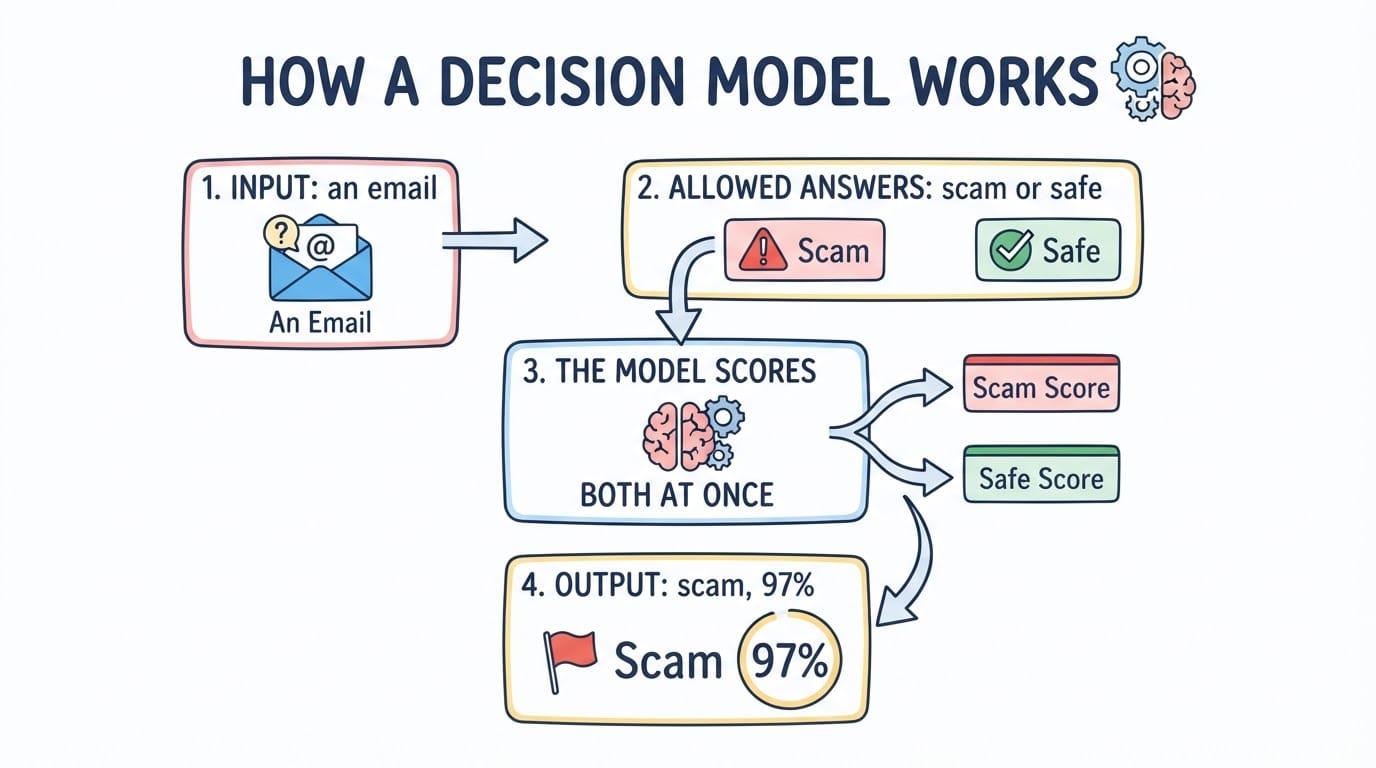
The model never writes text. It only scores the answers you allowed.
"Isn't That Just Multiple Choice?"
Yes. And that's exactly why it matters.
At first glance it sounds like something very niche, like a multiple-choice exam. But if you think about it, a huge amount of what we ask AI to do every day already is a decision. We just phrase it as an open question.
- "Is this email a scam?" is yes or no.
- "Which team should handle this ticket?" is one of five teams.
- "Which button should I click on this page?" is one of the 40 buttons on the page.
- "How urgent is this?" is a point on a scale.
You don't need a new problem. You need to say the problem you already have in a different way.
Why Bother? Speed and Cost
Because the difference isn't small.
TypeSafe says Jev's "end-to-end response time is 70ms-500ms" and input costs $0.042 per million tokens, with output tokens free (typesafe.ai). In OpenRouter's Jev tutorial, a call that answers three questions about a support ticket at once cost $0.00002.
For comparison: a normal language model has to write out its answer word by word, and you pay for every word. A decision model scores all the options in one pass and stops.
Those are vendor numbers. But I raced Jev against Cloudflare's two Clef models myself, like I wrote in a previous post, and Jev was the fastest on every task I gave it.
Fast enough that it stops feeling like "calling an AI". It feels like calling a function.
And honestly, I think this will replace a good chunk of the LLM infrastructure people have built for these jobs. Not the writing. The deciding.
What You Can Already Do With It
Here are a few examples that are already getting real traction:
- Clicking through websites. Browser Use built an agent called
jev-ultrafastthat looks at every page as a numbered list of buttons and fields, then asks Jev two questions at once: what to do, and on which element (github.com). What used to need a large language model to "think" about the page is now a pick from a list. - Spotting scams and phishing. Cloudflare uses Clef to fetch a website, look at it and classify it. Its example output literally reads "<1% phishing" (blog.cloudflare.com). The same pattern works for your inbox: is this email dangerous, yes or no, in near real time.
- Good bot or bad bot. Cloudflare also uses it to decide whether a crawler hitting a website is a good bot or a bad one (blog.cloudflare.com).
- Routing support tickets. Which team, how urgent, is it a bug. Cloudflare triages its own support requests this way (blog.cloudflare.com), and it's the example in OpenRouter's Jev tutorial.
- Guardrails for AI agents. Before an agent runs a command: is this safe, yes or no. TypeSafe lists guardrailing and detecting jailbreaks as core uses (typesafe.ai).
- Picking the right passage. In one of my own apps, Jev picks the best passages from PDF manuals before an answer is written (my race post).
There are many more. Anything where the answer is "one of these" is a candidate.
So if you haven't come in contact with decision models yet, I think now is the time to start understanding them and trying them out.
It Goes Further: Your Own Model, on Your Own Machine
Clef is open source under the Apache 2.0 license, and the weights are on Hugging Face. Cloudflare says it's released "for you to run locally and experiment with yourselves" (blog.cloudflare.com).
There are even smaller ones. Laya from Convai Innovations has 421M parameters, is also Apache 2.0, and is small enough for a laptop. The catch: its own model card warns it's weak out of the box, so you fine-tune it on your own examples first.
Fine-tuning is getting easier too. Cloudflare now offers to fine-tune Clef for your workload with its own team, and says a self-serve platform to "capture data, fine-tune, and redeploy the model" is planned (blog.cloudflare.com).
Think about that for a second. A model that makes your decisions, trained on your data, running on your own machine, answering in milliseconds.
How to Try It
The easiest way is OpenRouter, a single account that gives you access to hundreds of AI models. Jev, Clef and Clef-flash are all on it. No waitlist and no separate sign-up with TypeSafe.
Or go directly to TypeSafe for Jev, or to Cloudflare Workers AI for Clef. OpenAI's Decisions API started as a limited preview for selected customers (thenewstack.io).
And this is just the start. The ecosystem is growing fast: three big launches in 16 days, and more alternatives keep showing up.
The Limitations
- It can't write. If you need a text answer, you still need a normal language model. Browser Use's agent uses a small text model on the side just for typing.
- You have to know the options. If the right answer isn't on your list, the model can't invent it. That's the point, and also the catch.
- Most numbers are launch claims. Speed, price and "it can't hallucinate" come from the vendors. TypeSafe itself says its 0% hallucination number "is not empirical" (typesafe.ai). In my own test, Cloudflare's speed claims didn't hold up against Jev.
- Confidence isn't always useful. In my race, Jev's confidence clearly separated right from wrong answers. Clef's barely did.
- Jev is closed. It's a paid API. Clef is the open alternative.
- It's new. One reviewer's advice: "Do not put it in production this quarter" (wavect.io).
The Bottom Line
Decision models aren't a smarter chatbot. They're the opposite: an AI that's not allowed to talk.
And that's exactly why they're fast, cheap and predictable.
If you want to go deeper, I compared Jev against Cloudflare's Clef models with real numbers, and wrote about why Stripe wants OpenRouter.
Reference: Your First Decision Call
From OpenRouter's Jev tutorial. Replace the ticket with your own problem:
curl https://openrouter.ai/api/alpha/decisions \
  -H "Authorization: Bearer $OPENROUTER_API_KEY" \
  -H "Content-Type: application/json" \
  -d '{
    "model": "typesafe/jev-1.13",
    "state": {
      "ticket": "My checkout page shows a blank screen after I click Pay."
    },
    "questions": {
      "is_bug": {
        "type": "noul",
        "instructions": "Is the customer reporting a software defect?",
        "criteria": {
          "true": "The customer describes broken or unexpected product behavior.",
          "false": "The customer is asking a question or requesting a feature."
        }
      },
      "team": {
        "type": "choice",
        "instructions": "Which team should own this ticket?",
        "criteria": {
          "payments": "Checkout, billing, or payment processing issues.",
          "frontend": "Rendering, layout, or browser compatibility issues.",
          "account": "Login, permissions, or profile issues."
        }
      }
    }
  }'
You get back a probability for "is it a bug" and a pick for the team, with a probability for each option.
To turn your own problem into a decision:
- write down the question you keep asking an AI
- list every possible answer
- describe each answer in one line
- send the situation as the
state
Happy deciding.